

Choosing a TV stand for small space can be surprisingly difficult. In a compact apartment, bedroom, studio, or shared living area, every inch matters. A stand that looks perfect online can turn out to be too wide for the wall, too deep for the walkway, too low for comfortable viewing, or too shallow to hold your soundbar and streaming devices.
The good news is that you do not need to guess.
The right TV stand for a small space starts with three numbers: your TV's actual width, the stand's footprint, and the available clearance around it. From there, you can choose between a slim console, corner TV stand, floating unit, or wall-mounted setup based on how your room is used.
This guide explains how to measure for a TV stand, when wall mounting makes sense, how to use awkward corners and narrow walls, and which storage and cable-management features are worth prioritizing. By the end, you should know what size and type of TV stand fits your room before you order—without dealing with an expensive return or a console that makes your space feel even smaller.
Table of Contents
TV Stand Size Guide: Finding the Right Dimensions for Any Small Room
The most common TV-buying mistake is measuring only the screen's diagonal size. A 55-inch TV, for example, tells you the approximate screen category, but not the width of the television, the location of its feet, or the space required for connected equipment.
For a small room, those details matter more than the diagonal number.
Quick TV Stand Size Reference
The following ranges are practical starting points rather than rigid rules. Always compare them with your TV manufacturer's actual dimensions and the stand's published weight capacity.
TV Size | Suggested Stand Width | Typical Stand Depth | Practical Stand Height |
32" | 28–40 in / 71–102 cm | 10–15 in / 25–38 cm | 18–24 in / 46–61 cm |
43" | 38–50 in / 97–127 cm | 11–16 in / 28–41 cm | 20–26 in / 51–66 cm |
50" | 44–58 in / 112–147 cm | 12–16 in / 30–41 cm | 20–28 in / 51–71 cm |
55" | 48–64 in / 122–163 cm | 12–18 in / 30–46 cm | 20–30 in / 51–76 cm |
65"+ | 58–76+ in / 147–193+ cm | 14–20 in / 36–51 cm | 20–32 in / 51–81 cm |
A wider console is not automatically better. In a small space, the goal is to create enough visual and physical breathing room without wasting floor area.
Measure the TV, Not Just the Screen
Before shopping for a small TV stand, measure:
1. Total TV width: Measure from the far left edge of the TV to the far right edge.
2. Total TV height: Include the stand or legs when the TV will sit on the console.
3. Base footprint: Measure the distance between the TV's feet or the full width and depth of the base. This is especially important for TVs with wide-set legs.
4. TV weight: Check the complete TV weight and compare it with the stand's maximum load rating.
5. Wall space: Measure the usable width of the wall after accounting for windows, doors, trim, outlets, and adjacent furniture.
As a general design principle, a console that is at least slightly wider than the TV usually looks more balanced and gives you room for speakers or accessories. However, in a truly narrow room, prioritize safe support and clearances over visual symmetry.
Remember Soundbar Clearance
A soundbar changes the dimensions you need to plan.
Check the soundbar's width and depth, then leave enough open space in front of or around it for the speakers. Avoid positioning it so close to the screen that it blocks the bottom edge or interferes with the TV's infrared sensor.
For a slim TV stand, a low-profile soundbar can be easier to integrate than a deep home-theater speaker. If your soundbar has upward-firing drivers, follow the manufacturer's placement guidance and avoid putting objects directly above those speakers.
How High Should a TV Stand Be?
Comfortable viewing usually means keeping the center portion of the screen near eye level when you are seated.
A simple way to plan the height is:
Desired stand height ≈ seated eye height − the vertical distance from the TV's bottom edge to its screen center.
For example, if your seated eye level is about 40 inches from the floor and the center of the screen sits 15 inches above the TV's bottom edge, a stand around 25 inches high would put the screen center roughly at seated eye level.
The exact target can vary depending on your sofa, bed, recliner, viewing angle, and whether the TV is also tilted or wall mounted.
Wall-Mounted vs. Floor Stands: Space-Saving Options for Renters and Owners
If floor space is your biggest limitation, a wall-mounted TV is often the most efficient solution. It removes the console's footprint from the floor and can leave room underneath for a slim shelf, basket, desk, or open walking area.
However, mounting is not simply a matter of buying a bracket and drilling four holes.
Choose the Right Mount Type
Fixed mount: Best for the cleanest, closest-to-the-wall installation when your seating position is directly in front of the screen.
Tilting mount: Useful when the TV needs to sit slightly higher, such as above a low cabinet or furniture piece. Tilting can help reduce glare or improve the viewing angle.
Full-motion mount: Best when you need to turn the TV toward different seating areas. It provides flexibility but extends farther from the wall and places more leverage on the mounting structure.
Before purchasing any mount, check your TV's VESA mounting pattern and weight. VESA's Flat Display Mounting Interface standard defines mounting interfaces used across compatible displays and mounts.
Match the Hardware to the Wall
Wall construction matters just as much as the mount itself.
Wood-stud walls generally require the mount to be anchored into the studs. Concrete and concrete block require appropriate masonry anchors. Plaster and drywall may require a mounting solution designed for that wall construction.
Do not assume that ordinary drywall alone can safely support a heavy TV. Mounting instructions vary by product, and some mounts specifically prohibit unsupported drywall installation.
There are, however, specially engineered no-drill or no-stud mounts on the market for certain TVs and wall types. For example, some current products are designed specifically for direct drywall installation without traditional studs. The important point is to verify the exact load rating and wall requirements of the mount rather than treating "no drill" as a universal solution.
A Practical Installation Difficulty Guide
Fixed wall mount — Difficulty: Medium Tools may include a level, tape measure, screwdriver, drill, and stud finder, depending on the wall and mounting method.
Tilting mount — Difficulty: Medium Similar tools, with additional attention to the final viewing angle.
Full-motion mount — Difficulty: Medium to High Requires careful alignment and stronger attention to mounting structure because the extended arm creates additional leverage.
No-drill mount designed for your wall type — Difficulty: Low to Medium Only use this approach when the manufacturer explicitly confirms compatibility with your TV and wall.
For renters, a removable or low-damage solution can be appealing, but the lease, wall construction, TV weight, and manufacturer's instructions should all be checked first. A professional installer is the safer choice when you cannot confidently identify the wall structure.
Corner and Narrow TV Units: Smart Solutions for Awkward Layouts
Corners are often wasted in small homes, yet they can be ideal locations for a compact entertainment setup.
Choose the Right Corner TV Stand
Common corner TV stand shapes include:
Triangular or equilateral units: Designed to sit neatly into a conventional 90-degree corner.
Fan-shaped units: Provide a broader front surface while keeping the back relatively compact.
Custom-fit built-ins: The most efficient option for unusually shaped rooms, although they typically cost more and require more planning.
Before buying, measure both walls from the corner outward and note the width and depth of the baseboards. A stand may technically fit into the corner but still sit too far forward once trim, cables, and wall outlets are included.
How to Measure a Corner
Start at the exact corner point and measure the available wall length on both sides.
Then measure the maximum depth that will not interfere with doors, walkways, heating vents, or nearby furniture.
A useful rule is to treat the usable corner as a triangle rather than assuming the full nominal dimensions of the product will fit. Product dimensions should be compared with your real floor footprint, including any overhang.
Use Vertical Space on Narrow Walls
When width is limited, consider a narrow TV stand with vertical storage instead of a wide, low console.
A combination such as open shelving above and drawers or cabinets below can provide space for gaming consoles, routers, books, remotes, and decor without expanding too far into the walkway.
This approach follows a broader small-space design principle: use vertical space when floor area is scarce. Recent small-space design coverage continues to emphasize compact storage that takes advantage of overlooked vertical areas.
Storage, Cable Management, and Soundbar Placement Tips
A small TV stand has to work harder than a large one. Ideally, it should store your equipment, hide visual clutter, manage cables, and support the TV without making the room feel crowded.
Prioritize Hidden Storage
Look for:
- Drawers for remotes, controllers, and small accessories
- Cabinets for routers, consoles, and media devices
- Rear cable channels or cutouts
- Pull-out trays for frequently used equipment
- Adjustable shelves for devices of different heights
Open shelving looks lighter visually, but fully open storage can quickly become cluttered. In a small room, one or two concealed compartments can make a major difference.
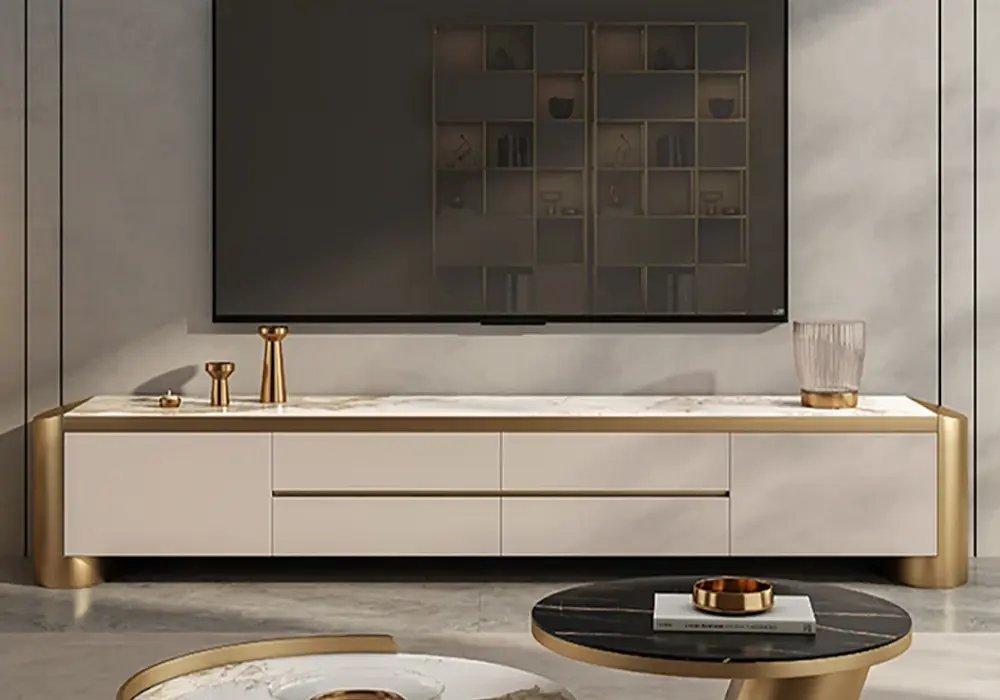
Modern 78.7" Off White & Gold TV Stand
Place the Soundbar Carefully
Your soundbar should have a clear acoustic path toward the seating area. Avoid covering its drivers with cabinet doors, decorative objects, or the TV stand's front lip.
If your TV sits on a slim console, measure the soundbar's depth before ordering. A console can be wide enough for the soundbar but still too shallow for its feet or connectors.
For wall-mounted TVs, a floating shelf directly below the display can provide a useful landing zone for a soundbar, provided there is enough clearance and the shelf is rated for the combined load.
Make Cable Management Part of the Design
The easiest cable-management systems are built into the furniture.
Look for rear openings that let HDMI, power, and speaker cables travel through the cabinet instead of hanging down the front or sides.
For wall-mounted installations, surface raceways or cable channels can create a cleaner appearance without requiring an in-wall electrical modification. Always keep power and low-voltage cables routed according to applicable local safety requirements.
Label both ends of important cables before hiding them. A small label such as "HDMI 1 — Console" can save considerable time when you need to troubleshoot or rearrange your setup.
For households with children or pets, secure loose cables against the rear of the stand or wall rather than leaving loops where they can be pulled. Keep power strips tucked away but accessible, and make sure ventilation openings on electronic equipment remain unobstructed.
How to Choose: Budget, Materials, and Style Trends
Once the dimensions are right, the next decision is quality and appearance. Because furniture pricing varies widely across countries and currencies, it is more useful to think in relative budget tiers than fixed prices.
Material Comparison
Particleboard: Affordable and widely available. Best when protected from moisture and assembled carefully.
Wood veneer: Gives a more natural appearance while typically costing less than solid wood. Look for well-finished edges and durable surfaces.
Solid wood: Strong and repairable, although heavier and often more expensive.
Metal frame: Useful for a slim, modern silhouette and can pair well with wood or engineered-wood panels.
The quality of hardware matters too. A beautifully finished TV stand with weak hinges or poorly aligned drawer slides can be less satisfying than a simpler design with better construction.
Consider Assembly Before Ordering
For flat-pack furniture, check the assembly instructions when available.
Easy: Basic tools, straightforward panels, approximately 30–60 minutes.
Moderate: Multiple shelves, doors, drawers, or cable-management components, often 1–2 hours.
Advanced: Larger units, wall integration, complex drawers, or heavy components that may require two people.
Times vary significantly by product and experience, so treat these as rough planning ranges.
Styles That Work Well in Small Rooms
Light Scandinavian-inspired furniture remains a strong option for compact spaces because pale wood, clean lines, and visually simple forms can keep a room feeling open. Mid-century-inspired pieces with tapered legs are another practical choice, especially when the raised base allows more visible floor underneath.
Black metal frames can create an industrial look while maintaining a relatively slim silhouette. Recent small-space design coverage also highlights the visual advantage of furniture elevated on legs: seeing more floor beneath a piece can help compact rooms feel more expansive.
For a particularly small room, be cautious with oversized glossy or mirrored surfaces. Reflective finishes can add light and visual depth, but too many reflective surfaces can also emphasize clutter. Use them selectively rather than assuming shinier always means larger.
Do Not Forget Delivery
Measure the route from the front door to the final room.
Check:
Door width → hallway width → stairwell/elevator → room entrance → installation area
A TV stand that fits the wall perfectly is useless if its package cannot make it through the doorway.
The Fastest Way to Choose the Right TV Stand
You do not need to compare every TV stand on the market.
Start with your maximum footprint. Then eliminate anything that exceeds your width or depth limits. Next, check TV weight, base footprint, soundbar clearance, storage needs, and installation requirements.
Use this decision filter:
Your Situation | Best Starting Option | Priority |
Very limited floor space | Wall-mounted TV + floating shelf | Minimum footprint |
Narrow wall | Slim/narrow TV stand | Depth and cable access |
Unused corner | Corner TV stand | Corner measurements |
Lots of devices | Low console with enclosed storage | Ventilation + cable routing |
Rented apartment | Approved low-damage/no-drill solution | Wall compatibility |
Bedroom setup | Compact stand with drawers | Height + shallow depth |
FAQ: TV Stand for Small Spaces
What size TV stand do I need for a 55-inch TV in a small living room?
Start with the TV's actual width rather than the 55-inch diagonal measurement. A stand around 48–64 inches wide can be a useful starting range, but the ideal choice depends on the television's footprint, the available wall width, your soundbar, and how much walking clearance you need. For a very tight room, a narrower console or wall-mounted setup may work better than a conventional wide cabinet.
Can I wall-mount a TV without drilling if I'm renting?
Sometimes. Certain wall mounts are specifically engineered for no-drill or no-stud installation, but compatibility depends on the TV's weight, wall construction, and the mount's approved specifications. Some products are designed for direct drywall installation, while other systems require studs or masonry anchors.
Never assume that a generic adhesive or lightweight wall hook is suitable for a TV. Use a mounting system whose manufacturer explicitly supports your TV and wall type.
How much space should I leave between the TV and a soundbar on a slim stand?
There is no single universal measurement because soundbar design varies. Leave enough clearance for the soundbar's speakers, controls, and airflow, and make sure it does not block the lower part of the TV or any sensors. If the soundbar uses upward-firing speakers, keep the area above it open according to the manufacturer's instructions.
How do I measure a corner to pick the right size corner TV unit?
Measure from the corner outward along both walls, then measure the maximum depth available before reaching a doorway, walkway, baseboard obstruction, or nearby furniture. Compare those measurements with the TV stand's actual footprint, not just its front width. For unusual corners, a paper or painter's-tape template on the floor can help you visualize the footprint before purchasing.
What's the easiest way to hide power strips, HDMI, and speaker cables in a small space?
Choose a TV stand with rear cable cutouts or a dedicated cable-management channel. Route cables toward the nearest outlet, secure excess cable behind the console, and label important connections. For wall-mounted TVs, a surface cable raceway can provide a cleaner appearance without cutting into the wall. Keep ventilation openings clear around streaming devices, routers, and game consoles.
Are TV stands with built-in storage sturdy enough for daily use?
Yes, when the construction and load rating are appropriate for the equipment being stored. Material alone does not determine durability; joinery, hardware, shelf support, and overall construction also matter. Solid wood is typically robust, while good-quality veneer and engineered-wood products can also perform well when properly constructed and protected from moisture. Always compare the manufacturer's stated weight capacity with the combined weight of your TV and equipment.